Don’t get an F on this test!
Failing grades are never good, but failing grades in the world of cybersecurity means a whole lot of increased risk. To make matters worse, the inexorable forward march of technology is increasing the attack surfaces available to the bad guys. Company websites used to exclusively serve marketing purposes, now the Internet hosts entire applications, payment processing, and more.
Similarly, there was a time when “securing your website” just meant enabling HTTPS on the webserver and trying to code your way around SQL Injection flaws and other OWASP Top 10s.
Those days are long gone. Creating a hardened, secure website that can fend off most common exploits is a much more sophisticated game now, requiring complex configurations in both your application and your webserver.
But where to start? Do you even know how well your website stacks up right now?
Mozilla Observatory (by the same Mozilla that makes the Firefox web browser) is a nifty, fast, and most importantly, 100% free website scanning service that you can use to highlight potential problems with the configuration of your webserver, application, or encryption.
Give the observatory any URL to get started, and the HTTP/S scanning tool gets out its bright red pen to give your website a grade.
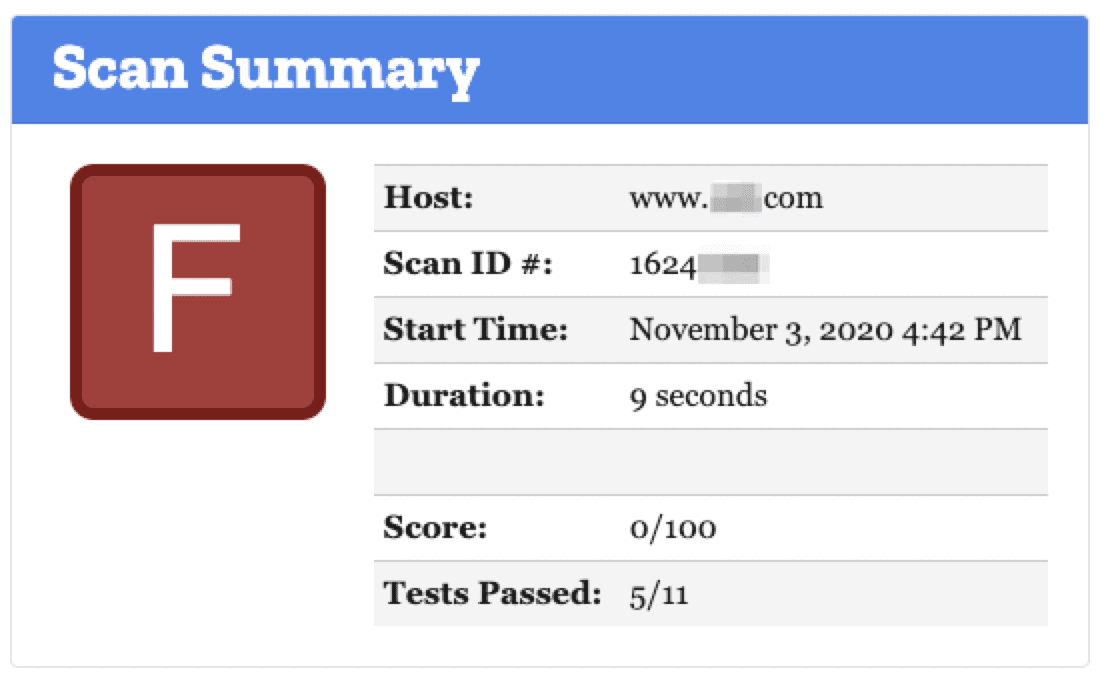
The grade is based on a scoring system out of 100 points. Every security flaw the tool identifies will dock you a certain number of points – some issues are weighed more than others! No Content Security Policy? -25 points. Subresource Integrity not implemented? -50 points!
The scorecard will help you understand why some sites are good, some are bad, and others are ugly.
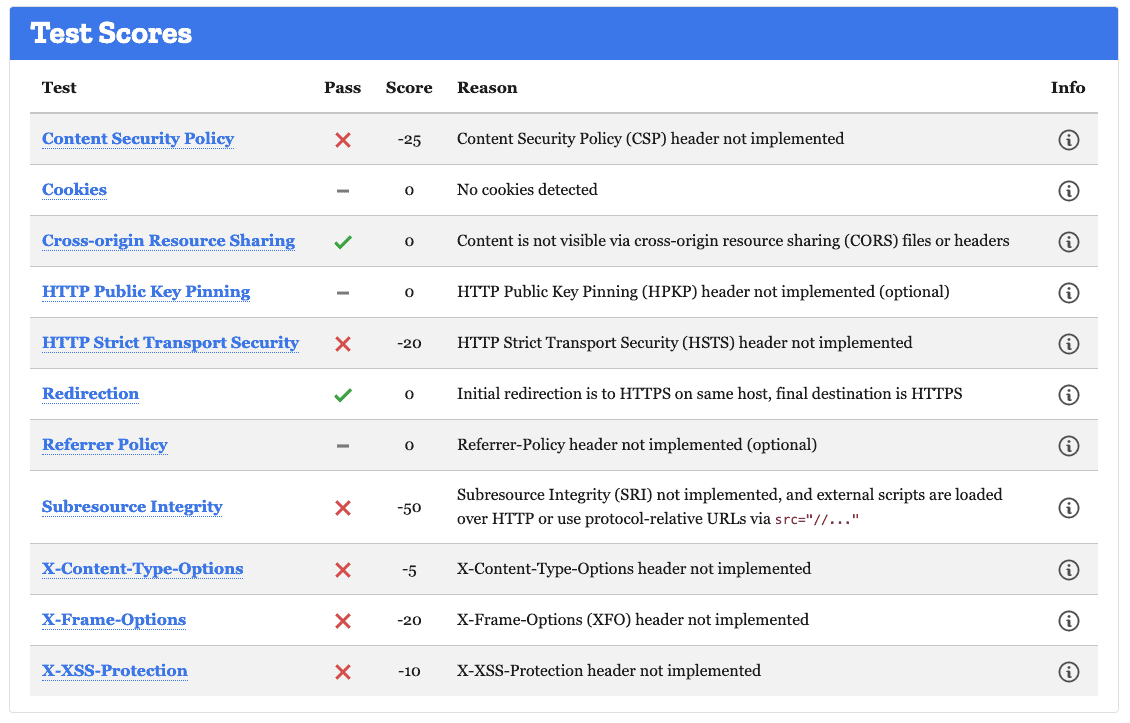
While getting a grade is useful for the overall picture, Mozilla Observatory takes it up another notch by providing a detailed explanation of each result. Hovering over the little “i” will give you a brief description of the piece. Clicking on the header will take you to a page with detailed information explaining the issue and where to approach the problem.
For example, let’s say you have a website that loses points on the HTTP Strict Transport Security section of the test and you want to understand why. HTTPS gives the user a secure connection to your site, but unless you force users to connect they may end up on the less-secure HTTP connection. Hover to learn that the “HTTP Strict Transport Security (HSTS) instructs web browsers to visit your site only over HTTPS.”

To get an idea of where to address the problem, click the link that reads HTTP Strict Transport Security. You’re taken to a page with tips on how to address the problem with example code to use. This makes it much easier to address the problem yourself, or communicate with your web developer about what needs to happen. This is a great place to start a conversation about your website security.
Implementing an HSTS header should be as simple as inserting a couple of lines of code into your site. Other problems on the test can be harder to fix, especially if your web hosting service doesn’t give you control over it. WordPress’s very own website doesn’t have a content security policy, and it can be a tough problem to address if your website uses plugins.
Other Mozilla Observatory Features
In addition to the HTTP/S scans, there are integrations with other well-known sites like Qualys SSL Labs and securityheaders.com and scans for your TLS and SSH security, though these are less easy to use and interpret than the easy scorecard the HTTP/S scan gives. Something to check for in the TLS Observatory is whether or not your website supports TLS 1.0 and 1.1.
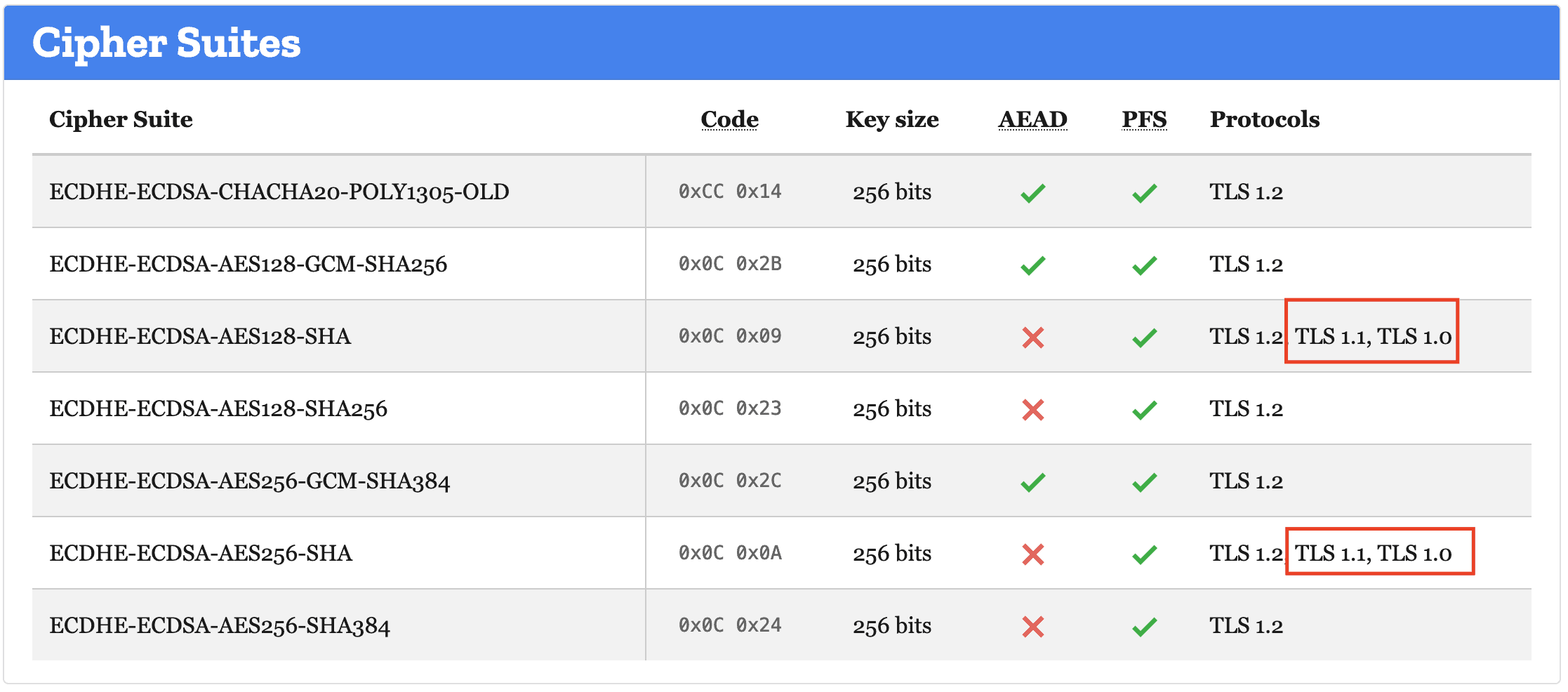
TLS (Transport Layer Security) is the encryption protocol used to encrypt web traffic to your website. TLS 1.0 and TLS 1.1 have been cracked and are no longer secure. If they show up in the Cipher Suites section of the TLS Observatory, ask your web team to stop supporting them.
If your website fails a bunch of tests and gets that red F, don’t feel down. Focus on one element at a time to slowly improve the security of your website.
Up for an “A+” challenge? Go for the extra-credit items and try to get your score above 100!
You definitely don’t want to fail this test, but there are unlimited retakes if you do. Grade your website and start taking steps to improve your security!
Want to get great cybersecurity content delivered to your inbox? Click here to sign up for our monthly newsletter, Tales from the Click.